

Translated by AI model Qwen/Qwen3-8B.
Source Language: Simplified Chinese, Target Language: english, Translation Time: 2026-05-01 14:59
.AI translation is for reference only. Accuracy is not guaranteed, please refer to the original text.
Preface
Recently surfing the internet, I accidentally discovered a very good website called H Comics Website (hit***.la). It is a website mainly featuring comics, where users can view and download comics, and all of these are free, without needing to log in or be a member. The experience is much better than E Station.
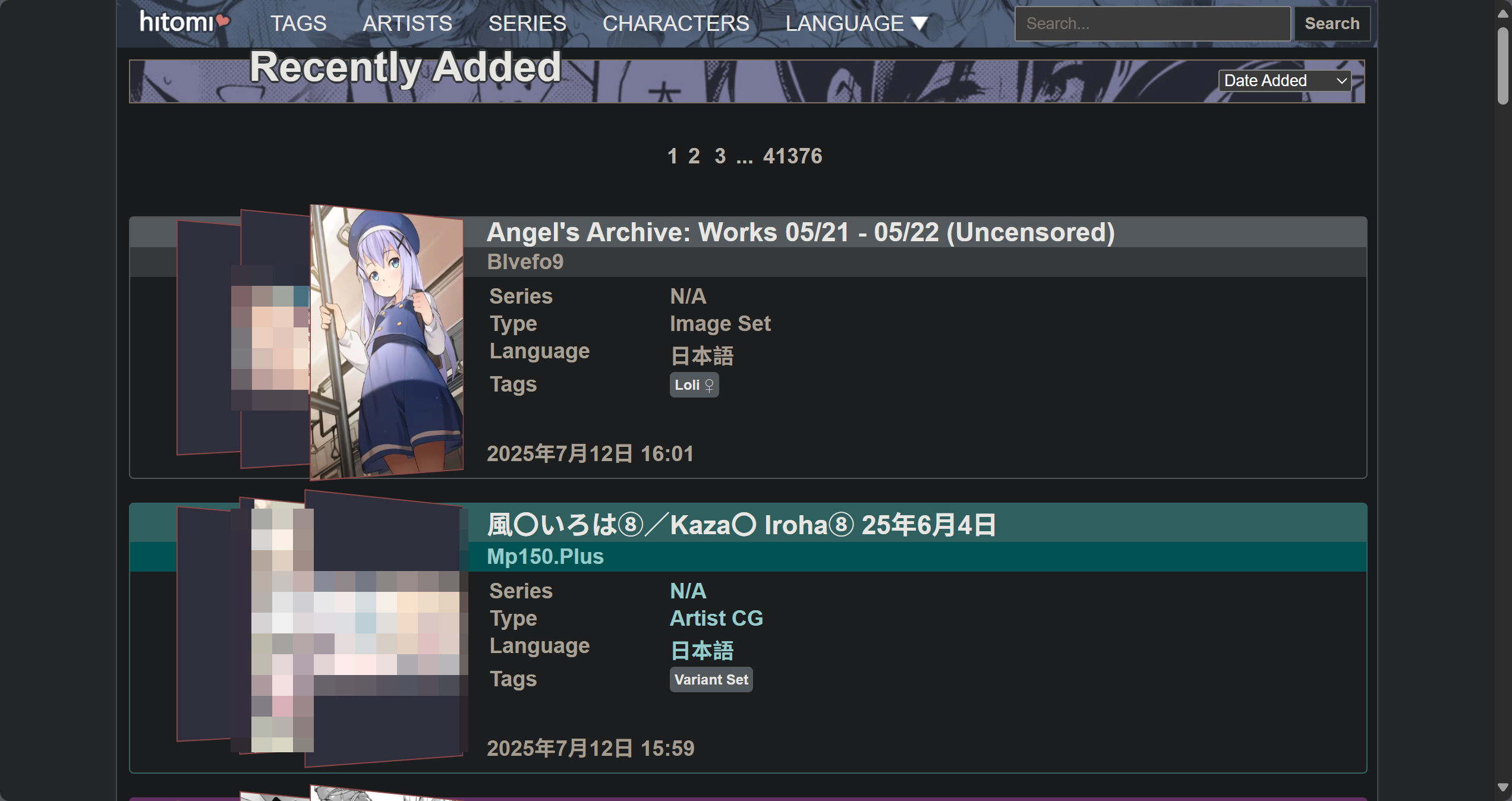
All these comics are available for download, and users can download them according to their needs. However, the download is implemented via JS on the frontend, so the download speed is relatively slow, and occasional download failures may occur. Especially without a stable and reliable proxy.
Therefore, I decided to write a scraper tool to batch download comics from the H Comics Website, and support multiple saving formats (such as images, PDF, EPUB, etc).
Step-by-step detailed process
After opening the target comic page, check the website's source code. It is clearly visible that the page uses dynamic loading.
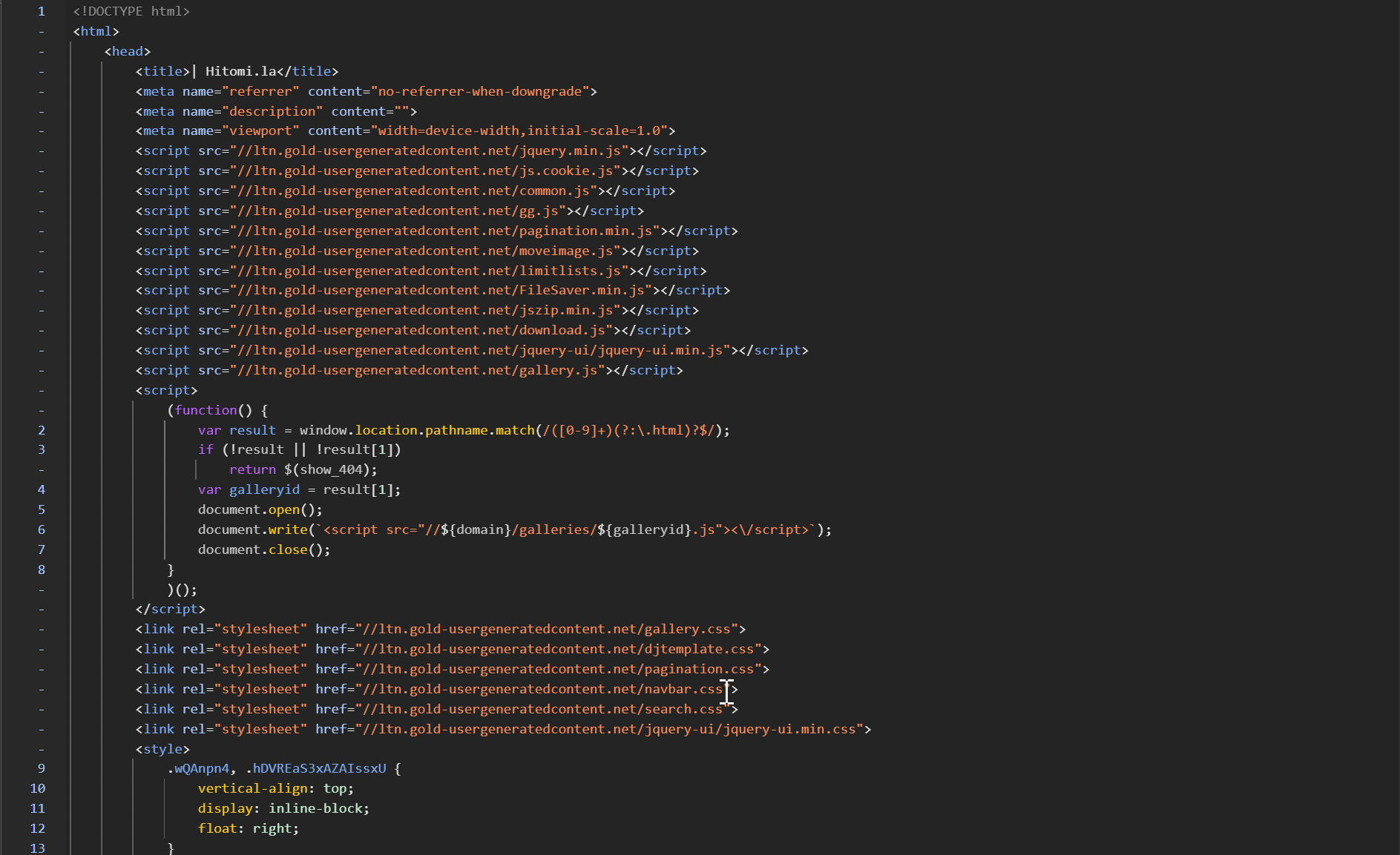
Considering that directly extracting content from the HTML source code of the page might be troublesome, but the page provides a JS-based pack download button, I decided to analyze this download function.
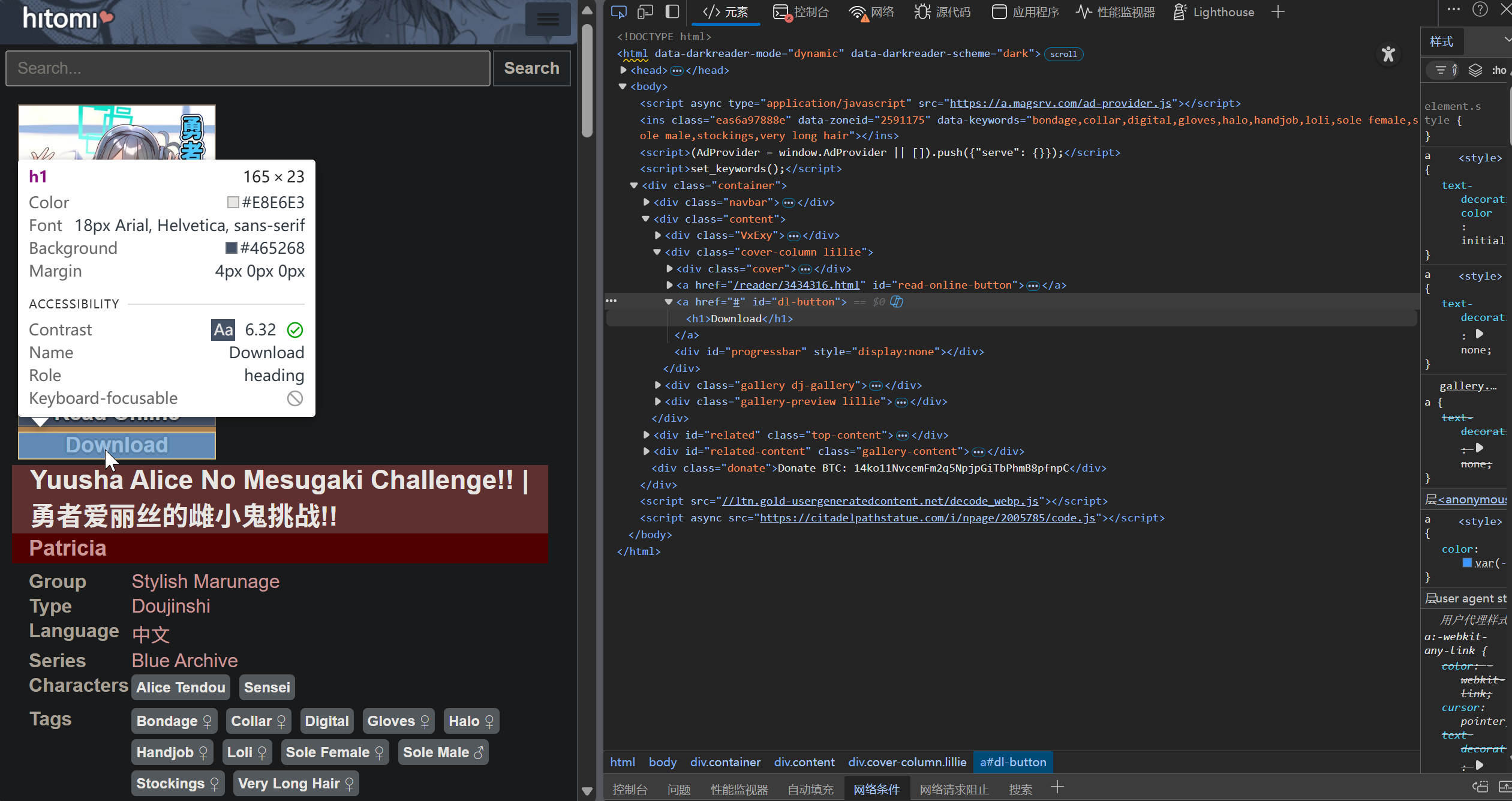
It can be seen that the download button's id is dl-button, and the download code can be obtained through this id.
But wouldn't it be faster to directly check in the console which request initiates the network call?
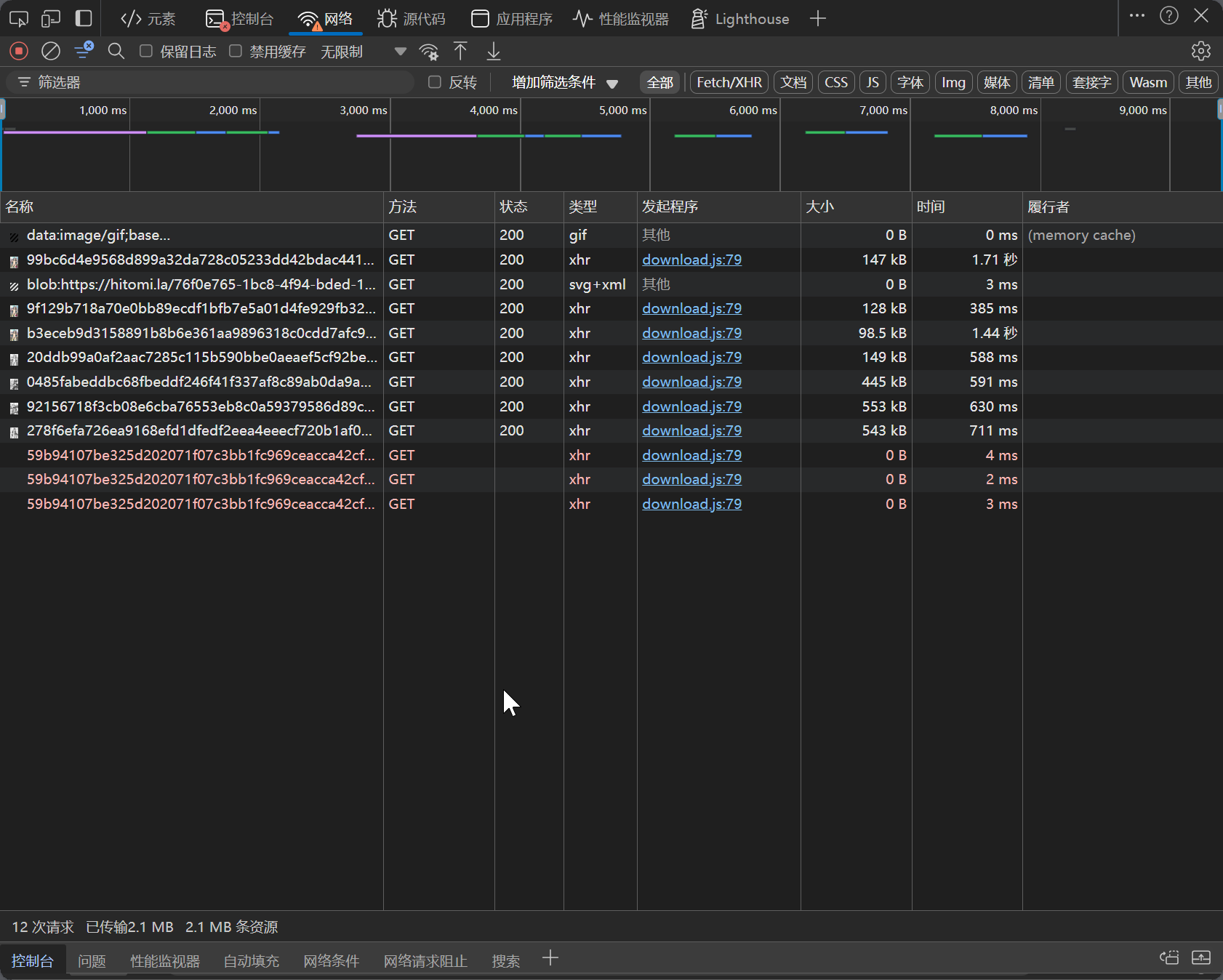
It can be seen that the network request is initiated by a download.js file, and the image download links are like https://.gold-usergenera*********.net/* etc.
First search for this image URL in the console, maybe we can directly get all the image download links.
But unfortunately, nothing can be found in the console, so we have to parse it through download.js.
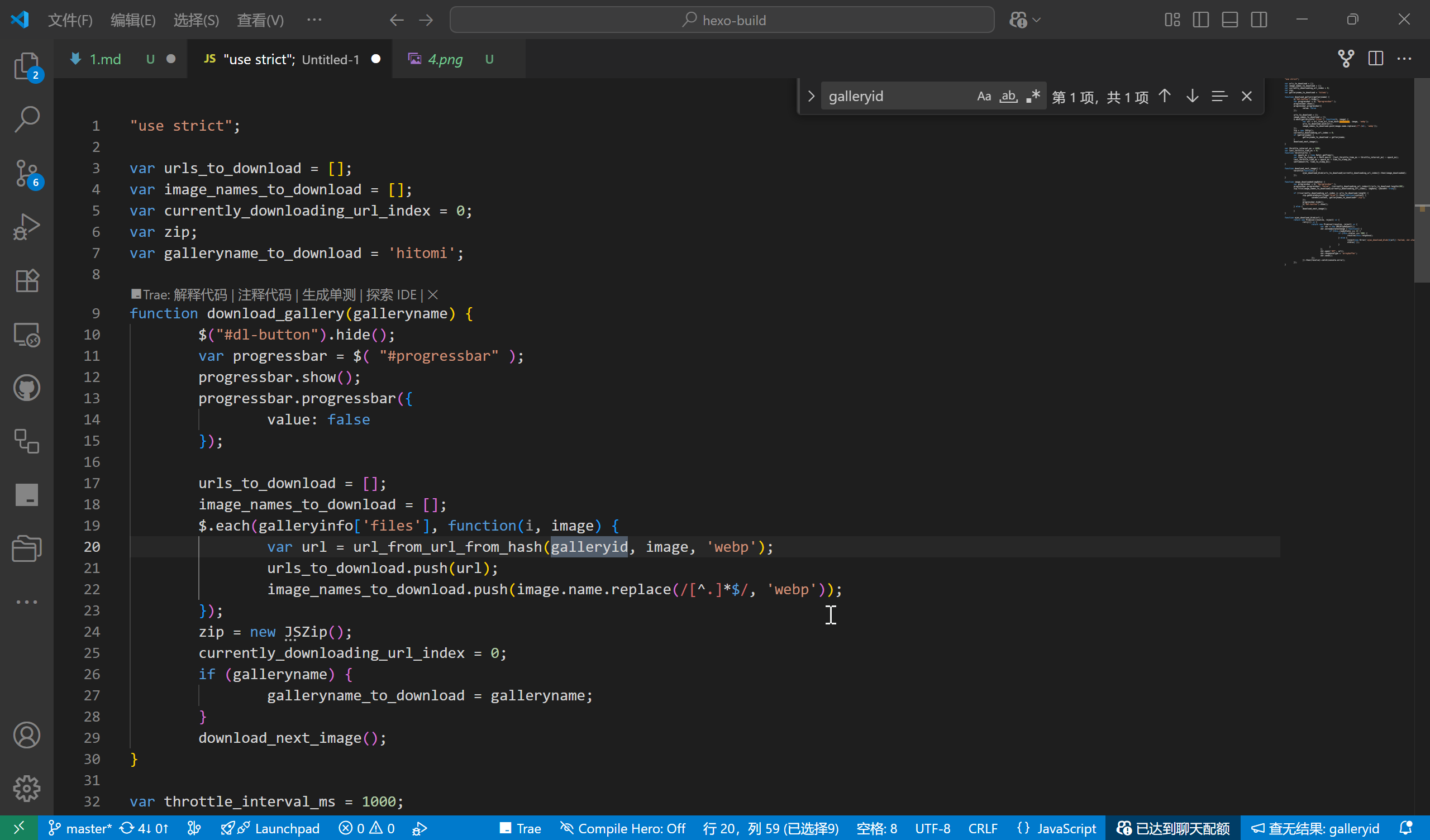
Through download.js, we can see that the download links are obtained via a function url_from_url_from_hash(galleryid,galleryinfo.files, 'webp').

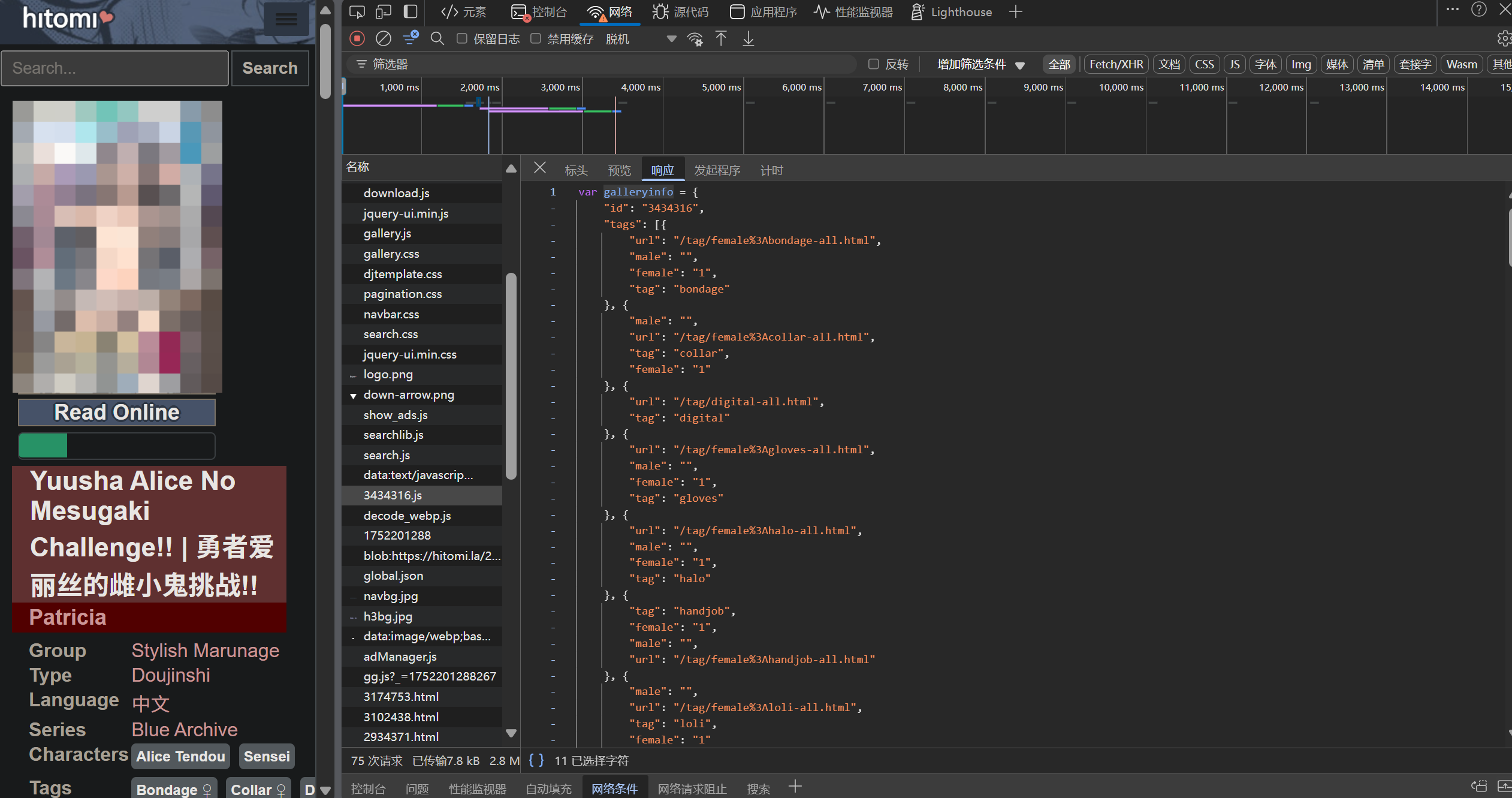
This object (galleryinfo) stores all the comic information. After searching for galleryinfo in the console and finding the object, we can determine that it is defined in the file https://ltn.gold-usergenera**********.net/galleries/3434316.js. By comparing galleryinfo, we can find that 3434316 is the comic's ID, with the preceding part being fixed and the trailing number varying.
Further analysis of the HTML source code reveals that this JS file is dynamically loaded. Originally, there was no such code in the HTML (<script src='******'></script>). Returning to the main HTML source code, we find a segment of code that clearly dynamically loads this JS file.
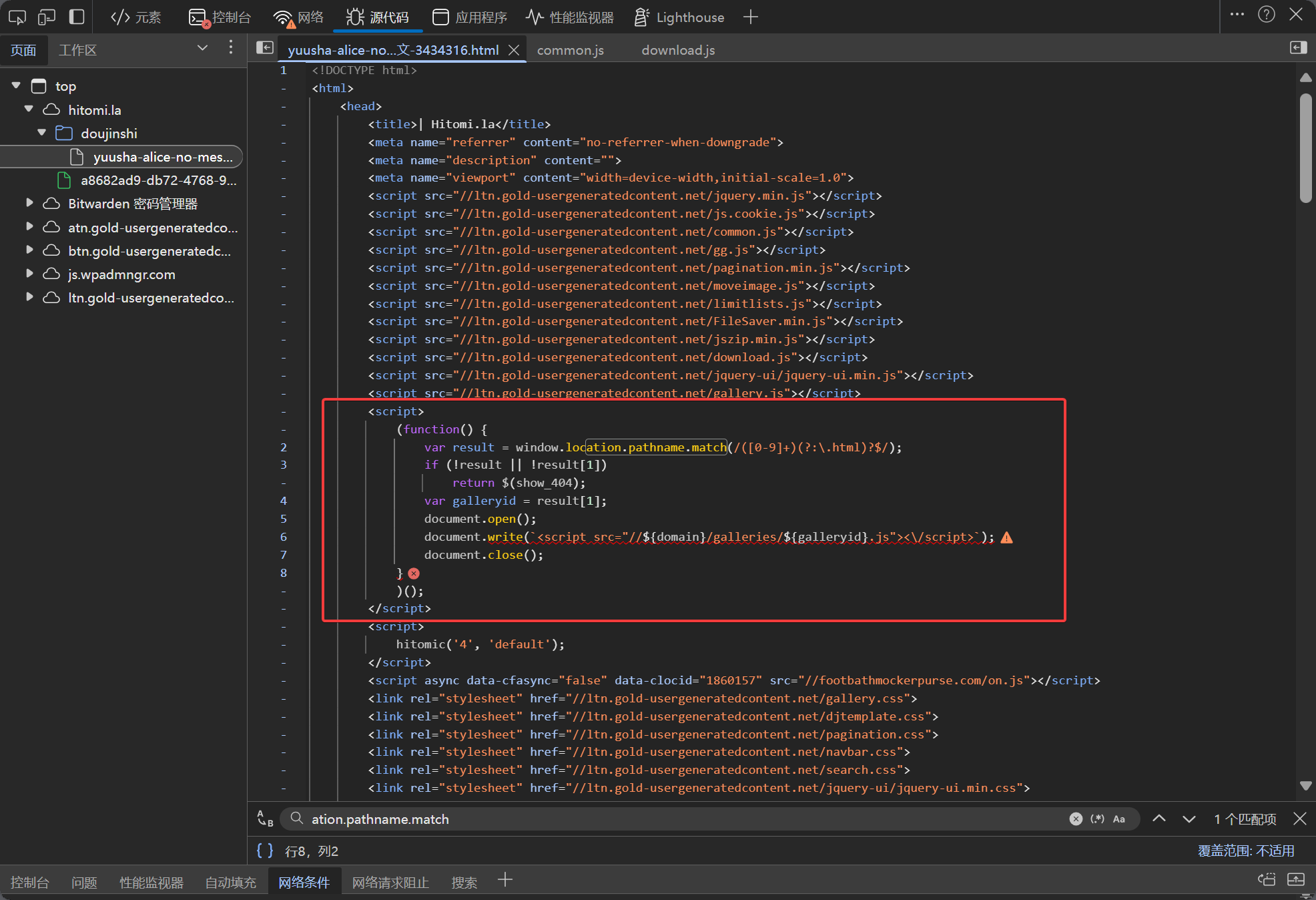
result = window.location.pathname.match(/([0-9]+)(?:\.html)?$/)
var galleryid = result[1]
This code uses regular expressions to extract the last numeric part from the URL path. This number is the comic's ID.
Based on this, we can use Python to extract the comic ID and obtain galleryinfo:
import json
import re
def get_galleryid(url):
    """
    从 URL 路径提取 ID
    url is str
    """
    pattern =  r'(\d+)\.html'
    match = re.search(pattern, url)

    if match:
        return match.group(1)  # 返回捕获组中的数字部分
    else:
        return None
galleryid = get_galleryid(url)
info_url = f'https://ltn.gold-usergenera**********.net/galleries/{galleryid}.js'
info_url = f'https://ltn.gold-usergenera**********.net/galleries/{galleryid}.js'
# more response code
info = json.loads(response.text.replace('var galleryinfo = ', ''))
Next, it's time to get the specific image download links.
Previously, in download.js, we found that the image download links are generated via url_from_url_from_hash(galleryid, image, 'webp'). The image is an object, corresponding to each element in the files array of galleryinfo.
Searching for url_from_url_from_hash in the console can locate several related functions and variables in common.js.
function subdomain_from_url()full_path_from_hash()real_full_path_from_hash()url_from_url_from_hash()url_from_hash()ggdomain2
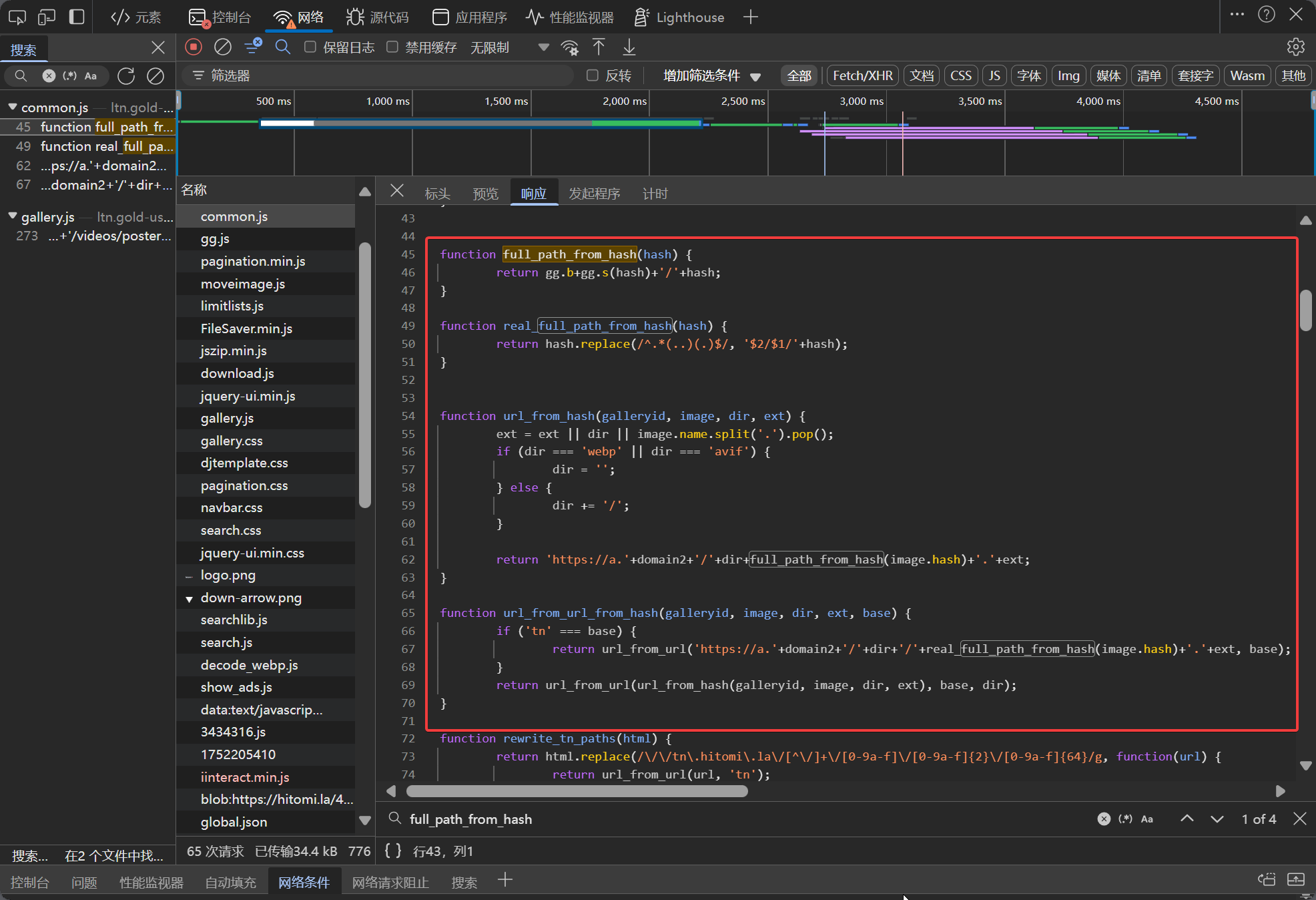
These functions mainly serve to parse and generate image download links, with url_from_url_from_hash being the entry function.
Notably, gg is a global variable, defined from https://ltn.gold-usergenera**********.net/gg.js?_=timestamp—the content of this file may change dynamically, so it needs to be re-fetched each time.
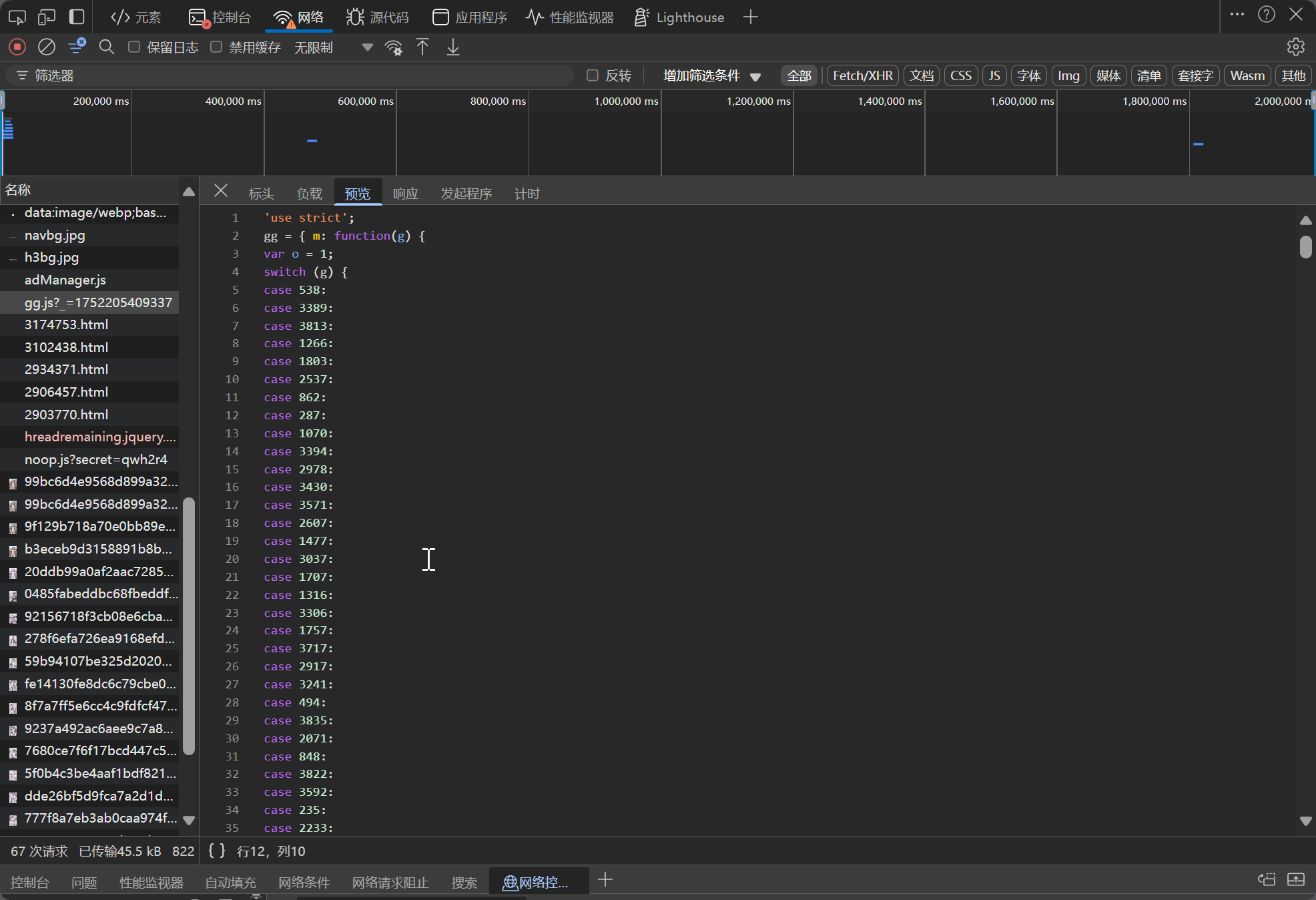
It's impractical to manually parse the gg.js code and convert it into Python code every time. Therefore, I considered directly running JS code using Python.
Thanks to the internet, there are several libraries for running JS code in Python, such as PyExecJS, PyV8, and Js2Py. However, these have not been maintained for a long time. I chose Js2Py because it's the most recently updated (though it was updated several years ago), and it doesn't support the latest Python versions. However, we can use the fixed version a-j-albert/Js2Py---supports-python-3.13.
pip install git+https://github.com/a-j-albert/Js2Py---supports-python-3.13.gitThe code here is used to obtain paths like 1752202801/1059.
import js2py
# more code
js_context = js2py.EvalJs()
js_context.execute(ggjs)
js_context.execute('''
function get(hash) {
    return gg.b+gg.s(hash);
}
''')
print(js_context.get(hash))
With the js2py library imported, we can directly run the JS code using js2py to dynamically generate image download links.
I wrote a random piece of code for testing, and indeed, it reported an error. The traceback indicated an error occurred when running the common.js code. It's likely that some code in common.js has issues when running in js2py. By deleting irrelevant code in common.js and only retaining necessary functions and variables, the code ran successfully after re-running.
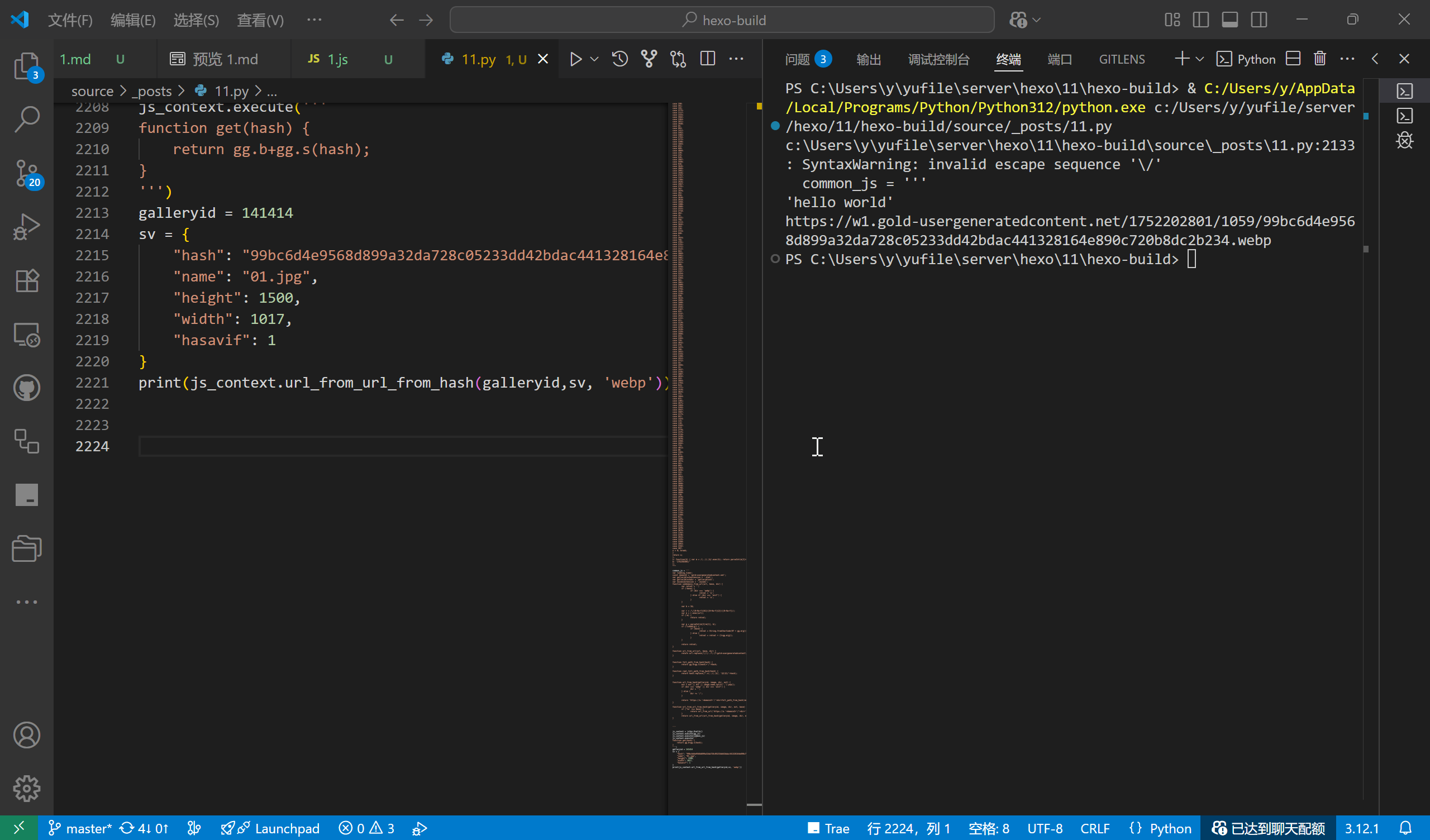
We can create a function to remove irrelevant code in common.js to avoid interference from unnecessary code. Use the split function to segment the common.js code, delete the irrelevant functions at the end and the variables at the beginning, and only retain the middle download functions. Create a Python function to obtain the necessary variable definitions.
import re
def get_js_value(name,js,type='var'):
    """
    通过正则表达式,从文本中查找并返回符合'var 名称 = 值;'格式的语句。
    """
    r = rf'{type}\s+{re.escape(name)}\s*=\s*[^;]*;'
    a= re.search(r, js)
    if a:
        return a.group(0)
    else:
        return None
def get_download_function(js):
    """获取关键函数及变量"""
    a = js.split('function rewrite_tn_paths')[0].split('function subdomain_f')
    b = 'function subdomain_f' + a[1]
    c = get_js_value('domain2',a[0],'const')
    return c + b
common_js=get_download_function(common_js)
At this point, we have clearly established the logic for obtaining comic information and all image download links.
Next, we need to build a function for initiating network requests. Considering potential access issues for the website in mainland China, the function should support proxy settings and a retry mechanism.
import requests
import time
def fetch(fetch_url):
    headers = {
        "accept": "*/*",
        "accept-language": "zh-CN,zh;q=0.9,en;q=0.8,en-GB;q=0.7,en-US;q=0.6",
        "sec-ch-ua": "\"Not)A;Brand\";v=\"8\", \"Chromium\";v=\"138\", \"Microsoft Edge\";v=\"138\"",
        "sec-ch-ua-mobile": "?0",
        "sec-ch-ua-platform": "\"Windows\"",
        "sec-fetch-dest": "empty",
        "sec-fetch-mode": "cors",
        "sec-fetch-site": "cross-site",
        "referer": f"{base_url}",
        "user-agent": "Mozilla/5.0 (Windows NT 10.0; Win64; x64) AppleWebKit/537.36 (KHTML, like Gecko) Chrome/138.0.0.0 Safari/537.36 Edg/138.0.0.0"
    }
    # 重试次数
    max_retries = 3
    retry_count = 0

    while retry_count < max_retries:
        try:
            if proxies:
                response = requests.get(fetch_url, headers=headers, timeout=10,proxies=proxies)
            else:
                response = requests.get(fetch_url, headers=headers, timeout=10)
            response.raise_for_status()  # 检查请求是否成功
            # print(f"请求成功,状态码: {response.status_code}")
            return response
        except requests.exceptions.RequestException as e:
            print(f"请求发生错误: {e}")
            print(f"当前重试次数: [{retry_count}/{max_retries}]")
            retry_count += 1
            time.sleep(2)  # 等待2秒后重试
    print("请求失败")
    return None
Don't forget that I mentioned earlier the need to save in formats like PDF and EPUB. Let's take EPUB as an example.
Pass in the required parameters, and use the ebooklib library to generate the EPUB file. I won't go into specific implementation details (check the code yourself).
from ebooklib import epub
from PIL import Image
import os
import uuid
from pycountry import languages
import tempfile
import re
def safe_filename(filename):
    """移除文件名中的非法字符"""
    return re.sub(r'[\\/:*?"<>|]', '', filename)
def epub_chapter_html_render(content,title="",type='text'):
    """
    渲染章节内容为 HTML 格式
    """
    if type == 'manga':
        return f"""
<?xml version="1.0" encoding="UTF-8"?>
<!DOCTYPE html>
<html xmlns="http://www.w3.org/1999/xhtml" xmlns:epub="http://www.idpf.org/2007/ops" lang="zh" xml:lang="zh">
<head>
    <meta charset="UTF-8" />
    <title>{title}</title>
    <meta name="viewport" content="width=device-width, initial-scale=1.0" />
  <link href="./style/default.css" rel="stylesheet" type="text/css" />
</head>
<body>
    <section id="ch01" epub:type="chapter">
                <div class="container">
                    <img src="{content}" alt="{title}"/>
                </div>
    </section>
</body>
</html>
"""
    elif type == 'text':
        return f"""
<?xml version="1.0" encoding="UTF-8"?>
<!DOCTYPE html>
<html xmlns="http://www.w3.org/1999/xhtml" xmlns:epub="http://www.idpf.org/2007/ops" lang="zh" xml:lang="zh">
<head>
    <meta charset="UTF-8" />
    <title>{title}</title>
    <meta name="viewport" content="width=device-width, initial-scale=1.0" />
</head>
<body>
    <!-- 章节标题 -->
    <section id="ch01" epub:type="chapter">
    <header>
        {'<h1>'+title+'</h1>' if title else ''}
    </header>
        <div class="container">
            {content}
        </div>
    </section>
</body>
</html>
"""

def get_language_code(language_name):
    try:
        # 获取语言对象
        lang = languages.get(name=language_name)
        # 返回 ISO 639-1 双字母代码(若存在),否则返回 ISO 639-2 三字母代码
        return lang.alpha_2 if hasattr(lang, 'alpha_2') else lang.alpha_3
    except AttributeError:
        print(f"语言名称不存在:{language_name}")
        return language_name
def create_manga_epub(ebook_meta,image_paths,output_file):
    """
    创建漫画EPUB文件

    :param ebook_meta: 漫画元数据
    :param output_path: 输出路径
    :return: None

    ebook_meta 示例
    {
        'title': f'{title}',
        'author': f'{artists}',
        'language': f'{language_localname}',
        'tags': f'{tags}',
        'parodys': f'{parodys}',
        'date': f'{date}',
        'description': f'{description}',
        'type': f'{type}',
    }
    """
    # 检查传入参数
    if not ebook_meta.get('title'):
        raise ValueError("title 不能为空")
    if image_paths:
        for i in image_paths:
            if not os.path.exists(i):
                raise ValueError(f"image_paths 不存在:{i}")
    else:
        raise ValueError("image_paths 不能为空")
    # os.makedirs(output_file, exist_ok=True)

    # 创建EPUB书籍对象
    book = epub.EpubBook()

    # 设置元数据
    book.set_identifier(str(uuid.uuid4()))
    book.set_title(ebook_meta.get('title'))
    book.set_language(get_language_code(ebook_meta.get('language')))
    book.add_author(ebook_meta.get('author'))
    book.add_metadata('DC', 'description', ebook_meta.get('description'))

    # 生成详情页
    book_intro_content = f"""
<p>书名:{ebook_meta.get('title')}</p>

<p>作者:{ebook_meta.get('author')}</p>
<p>语言:{ebook_meta.get('language')}</p>
<p>标签:{ebook_meta.get('tags')}</p>
<p>类型:{ebook_meta.get('type')}</p>
<p>系列:{ebook_meta.get('parodys')}</p>
<p>更新日期:{ebook_meta.get('date')}</p>
<p>简介:<p>
{ebook_meta.get('description')}</p>"""
    book_intro = epub.EpubHtml(
        title='详情',
        file_name="intro.xhtml",
        content=epub_chapter_html_render(book_intro_content,title='详情',type='text')
    )
    book.add_item(book_intro)

    # 添加封面图片
    cover_path = image_paths[0]
    # 打开并检查封面图片

    with Image.open(cover_path) as img:
        width, height = img.size
        if img.mode != 'RGB':
            img = img.convert('RGB')

        # 创建临时文件并获取文件对象和路径
        with tempfile.NamedTemporaryFile(suffix='.jpg', delete=False) as temp_file:
            temp_path = temp_file.name
            img.save(temp_path, 'JPEG')

        # 读取临时文件内容
        with open(temp_path, 'rb') as cover_file:
            cover_data = cover_file.read()

        # 手动删除临时文件
        os.remove(temp_path)
    # cover_image = epub.EpubImage(
    #     uid='cover_image',
    #     file_name='images/cover.jpg',
    #     media_type = 'image/jpeg',
    #     content=cover_data
    # )
    # book.add_item(cover_image)
    book.set_cover('images/cover.jpg', cover_data,create_page=True)


    # 添加 css
    css_content = '''
body {
    font-family: "Microsoft YaHei", "STXihei", sans-serif;
    font-size: 1.0em;
    line-height: 1.6;
    margin: 1em auto;
    max-width: 800px;
    padding: 0 1em;
    text-align: justify;
}
h1 {
	font-size: 28px;
	text-align: center;
	color: #91531d;
	font-weight: normal;
	margin-top: 2.5em;
	margin-bottom: 2.5em;
}
h2 {
	color: #1f4a92;
	font-size: 22px;
	font-family: "DK-XIAOBIAOSONG", "方正小标宋简体";
	font-weight: normal;
	border-bottom: solid 1px #1f4a92;
	padding: 0.2em 0em 0.5em 0em;
	text-indent: 0em;
}

p {
	font-family: "DK-SONGTI", "方正宋三简体", "方正书宋", "宋体";
	font-size: 16px;
	text-indent: 2em;
}

blockquote {
	font-size: 16px;
	text-indent: 2em;
}

img {
	width: 100%;
	height: auto;
	/* 居中 */
	margin: 0 auto;
}

hr {
	height: 10px;
	border: none;
	margin-top: 12px;
	border-top: 10px groove #87ceeb;
}

hr {
	color: #3dd9b6;
	border: double;
	border-width: 3px 5px;
	border-color: #3dd9b6 transparent;
	height: 1px;
	overflow: visible;
	margin-left: 20px;
	margin-right: 20px;
	position: relative;
}

hr:before,
hr:after {
	content: '';
	position: absolute;
	width: 5px;
	height: 5px;
	border-width: 0 3px 3px 0;
	border-style: double;
	top: -3px;
	background: radial-gradient(2px at 1px 1px, currentColor 2px, transparent 0) no-repeat;
}

hr:before {
	transform: rotate(-45deg);
	left: -20px;
}

hr:after {
	transform: rotate(135deg);
	right: -20px;
}
    '''
    book.add_item(epub.EpubItem(
        uid='style_defaultyle',
        file_name='style/default.css',
        media_type='text/css',
        content=css_content
    ))
    book.toc = []
    book.toc.append(epub.Link("intro.xhtml", "详情", "intro"))
    # 处理所有图片并创建章节
    chapters = []
    for i, img_path in enumerate(image_paths):
        # 读取图片数据
        with open(img_path, 'rb') as img_file:
            img_data = img_file.read()

        # 确定文件扩展名
        ext = os.path.splitext(img_path)[1].lower()
        media_type = f'image/{ext[1:]}' if ext else 'image/jpeg'

        # 创建图片项目
        img_item = epub.EpubItem(
            uid=f'image_{i}',
            file_name=f'images/page_{i}{ext}',
            media_type=media_type,
            content=img_data
        )

        # 添加图片
        book.add_item(img_item)

        # 创建章节
        chapter = epub.EpubHtml(
            title=f'P{i}',
            file_name=f'page_{i}.xhtml',
            content=epub_chapter_html_render(f'images/page_{i}{ext}',type='manga')
        )
        # 添加章节
        book.add_item(chapter)
        # 添加到目录中
        chapters.append(chapter)
        book.toc.append(epub.Link(f'page_{i}.xhtml', f'P{i}', f'page_{i}'))

    # 添加导航
    book.add_item(epub.EpubNcx())
    book.add_item(epub.EpubNav())

    book.spine = [book_intro, *chapters]

    # filename = safe_filename(ebook_meta.get('title'))

    # file_path = os.path.join(output_file, filename)

    # 写入文件
    if os.path.exists(output_file):
        os.remove(output_file)
    epub.write_epub(output_file, book, {})
    print(f'成功创建 EPUB: {output_file}')
Start writing the complete code
At this point, we should already have a clear understanding of how to obtain comic information and all image download links, and use Python to initiate requests for downloading images and saving them as EPUB files.
Next, we will start writing the complete Python script, but first we need to clarify the overall approach.
- Set the base URL
- Obtain galleryinid
- Obtain galleryinfo
- Parse comic information
- Obtain all image URLs
- Traverse and download images
- Generate EPUB file
First, import the libraries
import requests
import time
import json
import re
import os
import js2py
from ebooklib import epub
from PIL import Image
import uuid
from pycountry import languages
import tempfile
# 安装 rich traceback
# from rich.traceback import install
# install()
Set the base URL
base_url = 'https://hit***.la/doujinshi/******'
gg_url = '***'
common_url = '******'
Obtain and parse galleryinfo
# 基础 URL
galleryid = get_galleryid(base_url)

# 获取 galleryinfo
info_url = f'https://ltn.gold-usergenera**********.net/galleries/{galleryid}.js'
info_url = f'https://ltn.gold-usergenera**********.net/galleries/{galleryid}.js'
info_response = fetch(info_url)
galleryinfo = json.loads(info_response.text.replace('var galleryinfo = ', ''))
Parse comic information and print the comic details
# 解析漫画信息
title = galleryinfo.get('title')
artists = []
for item in galleryinfo.get('artists'):
    artists.append(item.get('artist'))
type = galleryinfo.get('type')
language_localname = galleryinfo.get('language_localname')
tags = []
for item in galleryinfo.get('tags'):
    tags.append(item.get('tag'))
parodys = []
for item in galleryinfo.get('parodys'):
    parodys.append(item.get('parody'))
date = galleryinfo.get('date')
# 打印详情
print(f'标题: {title}')
print(f'作者: {artists}')
print(f'类型: {type}')
print(f'语言: {language_localname}')
print(f'标签: {tags}')
print(f'系列: {parodys}')
print(f'页数: {len(galleryinfo.get("files"))}')
print(f'日期: {date}')
print(f'url: {base_url}')
Obtain gg.js and common.js code, create a js2py environment, and get all image URLs
# 获取 gg.js 和 common.js
gg_response = fetch(gg_url)
common_response = fetch(common_url)
gg_js = gg_response.text
common_js = common_response.text
common_js=get_download_function(common_js)

# 创建 js2py 环境
js_context = js2py.EvalJs()
js_context.execute(gg_js)
js_context.execute(common_js)

# 获取所有图片 url
urls = []
for file in galleryinfo['files']:
    urls.append(js_context.url_from_url_from_hash(galleryid,file, 'webp'))
All image URLs have been obtained. Then, we are ready to start downloading.
Create a download directory, with the directory name being {title} - {artists} - {language_localname}. Considering that `{title etc. might contain special characters that could cause errors, create a function to generate safe filenames.
def safe_filename(filename):
    """移除文件名中的非法字符"""
    return re.sub(r'[\\/:*?"<>|]', '', filename)
# 创建下载目录
download_dir = safe_filename(f'{title} - {artists} - {language_localname}')
os.makedirs(download_dir, exist_ok=True)
We can consider creating ametadata.json` file in the folder to store comic metadata.
# 保存 metadata (galleryinfo)
metadata_file = os.path.join(download_dir, 'metadata.json')
with open(metadata_file, 'w',encoding='utf-8') as f:

    json.dump(galleryinfo, f, indent=4,ensure_ascii=False )
Start traversing and downloading images
# 下载图片
print('开始下载')
filename = 0

for url in urls:
    print(f'下载进度: [{filename+1}/{len(urls)}]',end='\r')
    filepath = os.path.join(download_dir, str(filename)+'.webp')
    response = fetch(url)
    with open(filepath, 'wb') as f:
        f.write(response.content)
        print(f'下载完成: [{filename}/{len(urls)}], 大小: {len(response.content)} bytes')
    filename += 1
print('下载完成')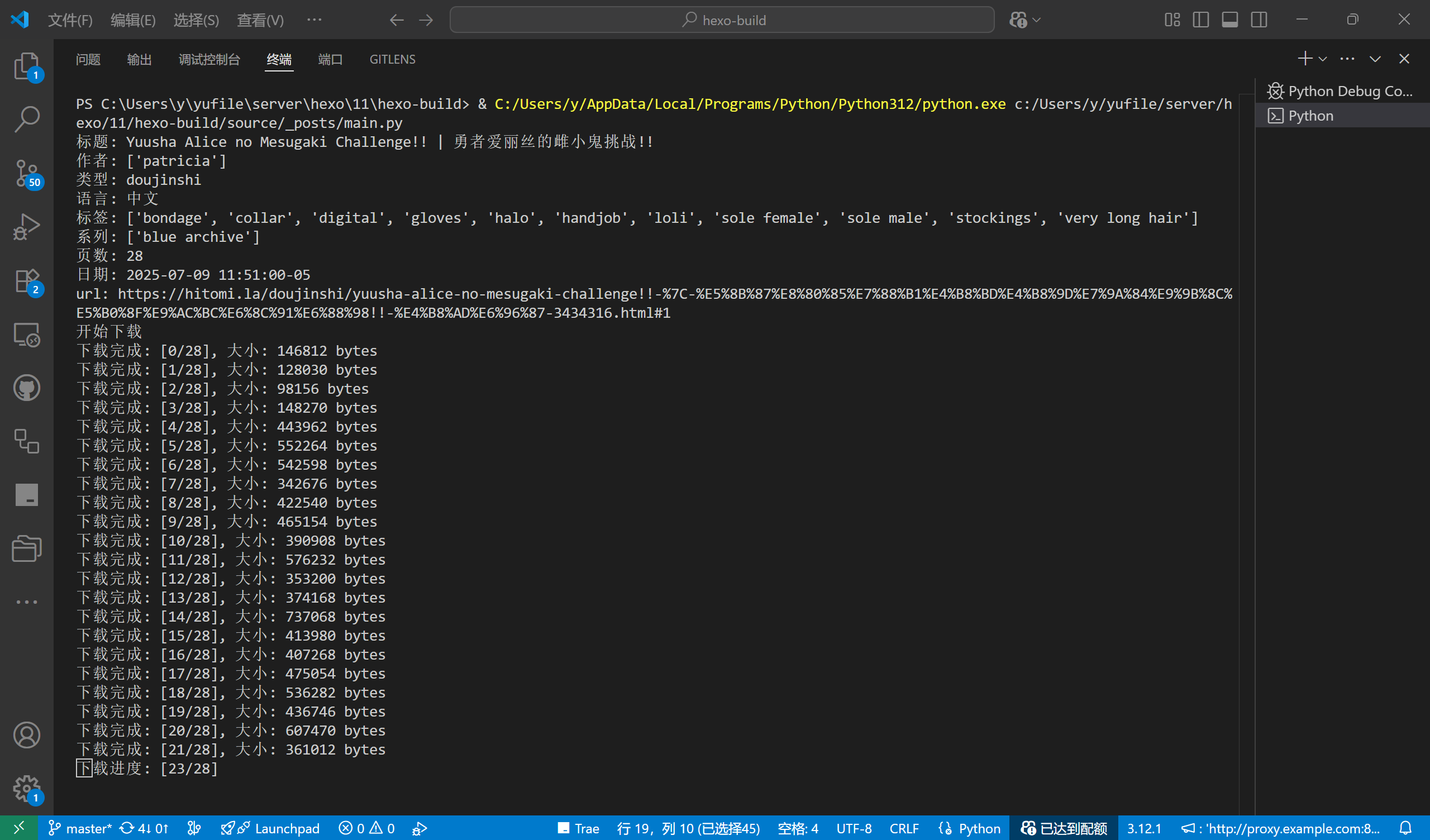
Generate the ebook_info dictionary, then run create_manga_epub() to generate the epub file.
ebook_info = {
    'title': f'{title}',
    'author': f'{artists}',
    'language': f'{language}',
    'tags': f'{tags}',
    'parodys': f'{parodys}',
    'date': f'{date}',
    'type': f'{type}',
}
output_file = f'{download_dir}.epub'
print('创建 EPUB 中...')
create_manga_epub(ebook_info,filepaths,output_file)
Finally, the complete code is as follows.
import requests
import time
import json
import re
import os
import js2py
from ebooklib import epub
from PIL import Image
import uuid
from pycountry import languages
import tempfile
# 安装 rich traceback
from rich.traceback import install
install()

# 基础设置

base_url = ''
gg_url = ''
common_url = ''

proxies = {
    # 'http': 'http://proxy.example.com:8080',
    # 'https': 'http://proxy.example.com:8080'
}


# 定义函数

def safe_filename(filename):
    """移除文件名中的非法字符"""
    return re.sub(r'[\\/:*?"<>|]', '', filename)

def get_galleryid(url):
    """
    从 URL 路径提取 ID
    url is str
    """
    pattern =  r'(\d+)\.html'
    match = re.search(pattern, url)

    if match:
        return match.group(1)  # 返回捕获组中的数字部分
    else:
        raise ValueError("galleryid 提取失败,请检查 URL")

def fetch(fetch_url):
    headers = {
        "accept": "*/*",
        "accept-language": "zh-CN,zh;q=0.9,en;q=0.8,en-GB;q=0.7,en-US;q=0.6",
        "sec-ch-ua": "\"Not)A;Brand\";v=\"8\", \"Chromium\";v=\"138\", \"Microsoft Edge\";v=\"138\"",
        "sec-ch-ua-mobile": "?0",
        "sec-ch-ua-platform": "\"Windows\"",
        "sec-fetch-dest": "empty",
        "sec-fetch-mode": "cors",
        "sec-fetch-site": "cross-site",
        "referer": f"{base_url}",
        "user-agent": "Mozilla/5.0 (Windows NT 10.0; Win64; x64) AppleWebKit/537.36 (KHTML, like Gecko) Chrome/138.0.0.0 Safari/537.36 Edg/138.0.0.0"
    }
    # 重试次数
    max_retries = 3
    retry_count = 0

    while retry_count < max_retries:
        try:
            if proxies:
                response = requests.get(fetch_url, headers=headers, timeout=10,proxies=proxies)
            else:
                response = requests.get(fetch_url, headers=headers, timeout=10)
            response.raise_for_status()  # 检查请求是否成功
            # print(f"请求成功,状态码: {response.status_code}")
            return response
        except requests.exceptions.RequestException as e:
            print(f"请求发生错误: {e}")
            print(f"当前重试次数: [{retry_count}/{max_retries}]")
            retry_count += 1
            time.sleep(2)  # 等待2秒后重试
    print("请求失败")
    return None

def get_js_value(name,js,type='var'):
    """
    通过正则表达式,从文本中查找并返回符合'var 名称 = 值;'格式的语句。
    """
    r = rf'{type}\s+{re.escape(name)}\s*=\s*[^;]*;'
    a= re.search(r, js)
    if a:
        return a.group(0)
    else:
        return None
def get_download_function(js):
    """获取关键函数及变量"""
    a = js.split('function rewrite_tn_paths')[0].split('function subdomain_f')
    b = 'function subdomain_f' + a[1]
    c = get_js_value('domain2',a[0],'const')
    return c + b

def epub_chapter_html_render(content,title="",type='text'):
    """
    渲染章节内容为 HTML 格式
    """
    if type == 'manga':
        return f"""
<?xml version="1.0" encoding="UTF-8"?>
<!DOCTYPE html>
<html xmlns="http://www.w3.org/1999/xhtml" xmlns:epub="http://www.idpf.org/2007/ops" lang="zh" xml:lang="zh">
<head>
    <meta charset="UTF-8" />
    <title>{title}</title>
    <meta name="viewport" content="width=device-width, initial-scale=1.0" />
  <link href="./style/default.css" rel="stylesheet" type="text/css" />
</head>
<body>
    <section id="ch01" epub:type="chapter">
                <div class="container">
                    <img src="{content}" alt="{title}"/>
                </div>
    </section>
</body>
</html>
"""
    elif type == 'text':
        return f"""
<?xml version="1.0" encoding="UTF-8"?>
<!DOCTYPE html>
<html xmlns="http://www.w3.org/1999/xhtml" xmlns:epub="http://www.idpf.org/2007/ops" lang="zh" xml:lang="zh">
<head>
    <meta charset="UTF-8" />
    <title>{title}</title>
    <meta name="viewport" content="width=device-width, initial-scale=1.0" />
</head>
<body>
    <!-- 章节标题 -->
    <section id="ch01" epub:type="chapter">
    <header>
        {'<h1>'+title+'</h1>' if title else ''}
    </header>
        <div class="container">
            {content}
        </div>
    </section>
</body>
</html>
"""

def get_language_code(language_name):
    try:
        # 获取语言对象
        lang = languages.get(name=language_name)
        # 返回 ISO 639-1 双字母代码(若存在),否则返回 ISO 639-2 三字母代码
        return lang.alpha_2 if hasattr(lang, 'alpha_2') else lang.alpha_3
    except AttributeError:
        print(f"语言名称不存在:{language_name}")
        return language_name
def create_manga_epub(ebook_meta,image_paths,output_file):
    """
    创建漫画EPUB文件

    :param ebook_meta: 漫画元数据
    :param output_path: 输出路径
    :return: None

    ebook_meta 示例
    {
        'title': f'{title}',
        'author': f'{artists}',
        'language': f'{language_localname}',
        'tags': f'{tags}',
        'parodys': f'{parodys}',
        'date': f'{date}',
        'description': f'{description}',
        'type': f'{type}',
    }
    """
    # 检查传入参数
    if not ebook_meta.get('title'):
        raise ValueError("title 不能为空")
    if image_paths:
        for i in image_paths:
            if not os.path.exists(i):
                raise ValueError(f"image_paths 不存在:{i}")
    else:
        raise ValueError("image_paths 不能为空")
    # os.makedirs(output_file, exist_ok=True)

    # 创建EPUB书籍对象
    book = epub.EpubBook()

    # 设置元数据
    book.set_identifier(str(uuid.uuid4()))
    book.set_title(ebook_meta.get('title'))
    book.set_language(get_language_code(ebook_meta.get('language')))
    book.add_author(ebook_meta.get('author'))
    book.add_metadata('DC', 'description', ebook_meta.get('description'))

    # 生成详情页
    book_intro_content = f"""
<p>书名:{ebook_meta.get('title')}</p>

<p>作者:{ebook_meta.get('author')}</p>
<p>语言:{ebook_meta.get('language')}</p>
<p>标签:{ebook_meta.get('tags')}</p>
<p>类型:{ebook_meta.get('type')}</p>
<p>系列:{ebook_meta.get('parodys')}</p>
<p>更新日期:{ebook_meta.get('date')}</p>
<p>简介:<p>
{ebook_meta.get('description')}</p>"""
    book_intro = epub.EpubHtml(
        title='详情',
        file_name="intro.xhtml",
        content=epub_chapter_html_render(book_intro_content,title='详情',type='text')
    )
    book.add_item(book_intro)

    # 添加封面图片
    cover_path = image_paths[0]
    # 打开并检查封面图片

    with Image.open(cover_path) as img:
        width, height = img.size
        if img.mode != 'RGB':
            img = img.convert('RGB')

        # 创建临时文件并获取文件对象和路径
        with tempfile.NamedTemporaryFile(suffix='.jpg', delete=False) as temp_file:
            temp_path = temp_file.name
            img.save(temp_path, 'JPEG')

        # 读取临时文件内容
        with open(temp_path, 'rb') as cover_file:
            cover_data = cover_file.read()

        # 手动删除临时文件
        os.remove(temp_path)
    # cover_image = epub.EpubImage(
    #     uid='cover_image',
    #     file_name='images/cover.jpg',
    #     media_type = 'image/jpeg',
    #     content=cover_data
    # )
    # book.add_item(cover_image)
    book.set_cover('images/cover.jpg', cover_data,create_page=True)


    # 添加 css
    css_content = '''
body {
    font-family: "Microsoft YaHei", "STXihei", sans-serif;
    font-size: 1.0em;
    line-height: 1.6;
    margin: 1em auto;
    max-width: 800px;
    padding: 0 1em;
    text-align: justify;
}
h1 {
	font-size: 28px;
	text-align: center;
	color: #91531d;
	font-weight: normal;
	margin-top: 2.5em;
	margin-bottom: 2.5em;
}
h2 {
	color: #1f4a92;
	font-size: 22px;
	font-family: "DK-XIAOBIAOSONG", "方正小标宋简体";
	font-weight: normal;
	border-bottom: solid 1px #1f4a92;
	padding: 0.2em 0em 0.5em 0em;
	text-indent: 0em;
}

p {
	font-family: "DK-SONGTI", "方正宋三简体", "方正书宋", "宋体";
	font-size: 16px;
	text-indent: 2em;
}

blockquote {
	font-size: 16px;
	text-indent: 2em;
}

img {
	width: 100%;
	height: auto;
	/* 居中 */
	margin: 0 auto;
}

hr {
	height: 10px;
	border: none;
	margin-top: 12px;
	border-top: 10px groove #87ceeb;
}

hr {
	color: #3dd9b6;
	border: double;
	border-width: 3px 5px;
	border-color: #3dd9b6 transparent;
	height: 1px;
	overflow: visible;
	margin-left: 20px;
	margin-right: 20px;
	position: relative;
}

hr:before,
hr:after {
	content: '';
	position: absolute;
	width: 5px;
	height: 5px;
	border-width: 0 3px 3px 0;
	border-style: double;
	top: -3px;
	background: radial-gradient(2px at 1px 1px, currentColor 2px, transparent 0) no-repeat;
}

hr:before {
	transform: rotate(-45deg);
	left: -20px;
}

hr:after {
	transform: rotate(135deg);
	right: -20px;
}
    '''
    book.add_item(epub.EpubItem(
        uid='style_defaultyle',
        file_name='style/default.css',
        media_type='text/css',
        content=css_content
    ))
    book.toc = []
    book.toc.append(epub.Link("intro.xhtml", "详情", "intro"))
    # 处理所有图片并创建章节
    chapters = []
    for i, img_path in enumerate(image_paths):
        # 读取图片数据
        with open(img_path, 'rb') as img_file:
            img_data = img_file.read()

        # 确定文件扩展名
        ext = os.path.splitext(img_path)[1].lower()
        media_type = f'image/{ext[1:]}' if ext else 'image/jpeg'

        # 创建图片项目
        img_item = epub.EpubItem(
            uid=f'image_{i}',
            file_name=f'images/page_{i}{ext}',
            media_type=media_type,
            content=img_data
        )

        # 添加图片
        book.add_item(img_item)

        # 创建章节
        chapter = epub.EpubHtml(
            title=f'P{i}',
            file_name=f'page_{i}.xhtml',
            content=epub_chapter_html_render(f'images/page_{i}{ext}',type='manga')
        )
        # 添加章节
        book.add_item(chapter)
        # 添加到目录中
        chapters.append(chapter)
        book.toc.append(epub.Link(f'page_{i}.xhtml', f'P{i}', f'page_{i}'))

    # 添加导航
    book.add_item(epub.EpubNcx())
    book.add_item(epub.EpubNav())

    book.spine = [book_intro, *chapters]

    # filename = safe_filename(ebook_meta.get('title'))

    # file_path = os.path.join(output_file, filename)

    # 写入文件
    if os.path.exists(output_file):
        os.remove(output_file)
    epub.write_epub(output_file, book, {})
    print(f'成功创建EPUB: {output_file}')

def main():
    galleryid = get_galleryid(base_url)

    # 获取 galleryinfo
    info_url = f'https://ltn.gold-u*********.net/galleries/{galleryid}.js'
    info_response = fetch(info_url)
    galleryinfo = json.loads(info_response.text.replace('var galleryinfo = ', ''))

    # 解析漫画信息
    title = galleryinfo.get('title')
    artists = []
    for item in galleryinfo.get('artists'):
        artists.append(item.get('artist'))
    type = galleryinfo.get('type')
    language = galleryinfo.get('language')
    language_localname = galleryinfo.get('language_localname')
    tags = []
    for item in galleryinfo.get('tags'):
        tags.append(item.get('tag'))
    parodys = []
    for item in galleryinfo.get('parodys'):
        parodys.append(item.get('parody'))
    date = galleryinfo.get('date')
    # 打印详情
    print(f'标题: {title}')
    print(f'作者: {artists}')
    print(f'类型: {type}')
    print(f'语言: {language_localname}({language})')
    print(f'标签: {tags}')
    print(f'系列: {parodys}')
    print(f'页数: {len(galleryinfo.get("files"))}')
    print(f'日期: {date}')
    print(f'url: {base_url}')

    # # 获取所有图片 hash
    # hashes = []
    # for item in galleryinfo['files']:
    #     hashes.append(item['hash'])


    # 获取 gg.js 和 common.js
    gg_response = fetch(gg_url)
    common_response = fetch(common_url)
    gg_js = gg_response.text
    common_js = common_response.text
    common_js=get_download_function(common_js)

    # 创建 js2py 环境
    js_context = js2py.EvalJs()
    js_context.execute(gg_js)
    js_context.execute(common_js)

    # 获取所有图片 url
    urls = []
    for file in galleryinfo['files']:
        urls.append(js_context.url_from_url_from_hash(galleryid,file, 'webp'))

    # 创建下载目录
    download_dir = safe_filename(f'{title} - {artists} - {language_localname}')
    os.makedirs(download_dir, exist_ok=True)

    # 保存 metadata (galleryinfo)
    metadata_file = os.path.join(download_dir, 'metadata.json')
    with open(metadata_file, 'w',encoding='utf-8') as f:

        json.dump(galleryinfo, f, indent=4,ensure_ascii=False )

    # 下载图片
    print('开始下载')
    filename = 0
    filepaths = []

    for url in urls:
        print(f'下载进度: [{filename+1}/{len(urls)}]',end='\r')
        filepath = os.path.join(download_dir, str(filename)+'.webp')
        response = fetch(url)
        with open(filepath, 'wb') as f:
            f.write(response.content)
            print(f'下载完成: [{filename+1}/{len(urls)}], 大小: {len(response.content)} bytes')
        filename += 1
        filepaths.append(filepath)
    print('下载完成')

    ebook_info = {
        'title': f'{title}',
        'author': f'{artists}',
        'language': f'{language}',
        'tags': f'{tags}',
        'parodys': f'{parodys}',
        'date': f'{date}',
        'type': f'{type}',
    }
    output_file = f'{download_dir}.epub'
    print('创建 EPUB 中...')
    create_manga_epub(ebook_info,filepaths,output_file)


# 运行主函数
if __name__ == '__main__':
        main()
BUG Fix
When using objects generated by epub.EpubHtml, any content defined within the <head> element will be ignored. That is, <link> elements contained in the <head> will not appear in the xhtml.
The method to add css is as follows, use chapter.add_item(default_css)
default_css = epub.EpubItem()
book.add_item(default_css)
chapter = epub.EpubHtml()
chapter.add_item(default_css)
Then the function create_manga_epub() needs to be modified as follows
# 删去前面的 book.add_item(book_intro)
# ===================
# 修改 css 添加
# book.add_item(epub.EpubItem(
    # uid='style_defaultyle',
    # file_name='style/default.css',
    # media_type='text/css',
    # content=css_content
# ))
# 改为
default_css=epub.EpubItem(
    uid='style_defaul',
    file_name='style/default.css',
    media_type='text/css',
    content=css_content
)
book.add_item(default_css)
book_intro.add_item(default_css)
book.add_item(book_intro)
# ===================
# 在章节添加到 EPUB 前先给 chapter 加上 css
chapter.add_item(default_css)
book.add_item(chapter)
For those that have already been downloaded, you can run this code to add <link> elements to all EPUBs in the current directory.
import os
import re
import zipfile
import tempfile
import shutil

# 要添加的CSS链接
CSS_LINK = '<link href="style/default.css" rel="stylesheet" type="text/css"/>'

def add_css_to_epubs():
    # 获取当前目录所有EPUB文件
    epub_files = [f for f in os.listdir('.')
                 if os.path.isfile(f) and f.lower().endswith('.epub')]

    for epub in epub_files:
        process_epub(epub)

def process_epub(epub_path):
    # 创建临时工作目录
    with tempfile.TemporaryDirectory() as tmp_dir:
        # 解压EPUB到临时目录
        with zipfile.ZipFile(epub_path, 'r') as zf:
            zf.extractall(tmp_dir)

        # 遍历所有XHTML文件并修改
        for root, _, files in os.walk(tmp_dir):
            for file in files:
                if file.lower().endswith(('.xhtml', '.html')):
                    file_path = os.path.join(root, file)
                    add_css_link(file_path)
        new_epub = epub_path + '.new'
        with zipfile.ZipFile(new_epub, 'w') as new_zf:
            # 添加mimetype(无压缩)
            mimetype_path = os.path.join(tmp_dir, 'mimetype')
            if os.path.exists(mimetype_path):
                new_zf.write(mimetype_path, 'mimetype', compress_type=zipfile.ZIP_STORED)
            for root, _, files in os.walk(tmp_dir):
                for file in files:
                    if file == 'mimetype':
                        continue
                    full_path = os.path.join(root, file)
                    rel_path = os.path.relpath(full_path, tmp_dir)
                    new_zf.write(full_path, rel_path)

        # 替换原始文件
        shutil.move(new_epub, epub_path)
        print(f"已处理: {epub_path}")

def add_css_link(file_path):
    with open(file_path, 'r+', encoding='utf-8') as f:
        content = f.read()
        # 使用正则查找<head>标签(带属性)
        head_match = re.search(r'<head\b[^>]*>', content)

        if head_match:
            head_tag = head_match.group(0)
            new_content = content.replace(
                head_tag,
                head_tag + '\n    ' + CSS_LINK,
                1  # 只替换第一个匹配项
            )
            f.seek(0)
            f.write(new_content)
            f.truncate()

if __name__ == '__main__':
    add_css_to_epubs()
    print("所有EPUB文件处理完成!")
Improve
Try to avoid using third-party libraries (js2py)
Special thanks to leaphy for the decomposition and analysis of the regular expression implementation in gg.js.
The following code can achieve the functionality of gg.js
import re
class GG:
    def __init__(self, js_code):
        self.b = self.parse_b_property(js_code)
        self.case_values = self.parse_case_values(js_code)
    @staticmethod
    def parse_b_property(js_code):
    # 匹配 b
        match = re.search(r'b\s*:\s*["\'](.*?)["\']', js_code)

        return match.group(1) if match else None

    @staticmethod
    def parse_case_values(js_code):
        # 匹配 case
        case_pattern = re.compile(r"case\s+(\d+):")
        cases = case_pattern.findall(js_code)
        return set(map(int, cases))

    def m(self, g):
        return 1 if g in self.case_values else 0

    @staticmethod
    def s(h):
        match = re.search(r'(..)(.)$', h)
        if match:
            swapped = match.group(2) + match.group(1)
            return str(int(swapped, 16))
        return '0'
gg = GG(gg_js)
print(f'gg: {gg}')
print(f"gg.b: {gg.b}")
print("gg.s('4d9433e700052a6f9c2a56a48c15830d864f8bb2abe1cccb711b07a491751d8c')")
print(gg.s('4d9433e700052a6f9c2a56a48c15830d864f8bb2abe1cccb711b07a491751d8c'))
common.js implementation
import re
# 导入 GG 类
from ggpy import GG
# 模拟数据
gg = GG(gg_js)
# 全局变量(与 JavaScript 中一致)
# 可以考虑实时获取
domain2 = 'gold-usergeneratedcontent.net'


def subdomain_from_url(url, base, dir):
    retval = ''
    if not base:
        if dir == 'webp':
            retval = 'w'
        elif dir == 'avif':
            retval = 'a'

    pattern = re.compile(r'\/[0-9a-f]{61}([0-9a-f]{2})([0-9a-f])')
    match = pattern.search(url)
    if not match:
        return retval

    hex_part = match.group(2) + match.group(1)
    try:
        g = int(hex_part, 16)
    except ValueError:
        return retval

    if base:
        char_code = 97 + gg.m(g)
        retval = chr(char_code) + base
    else:
        retval += str(1 + gg.m(g))

    return retval

def url_from_url(url, base, dir):
    pattern = r'//..?\.(?:gold-usergeneratedcontent\.net|hitomi\.la)/'
    replacement = '//' + subdomain_from_url(url, base, dir) + '.' + domain2 + '/'
    return re.sub(pattern, replacement, url, count=1)

def full_path_from_hash(hash_str):
    return f"{gg.b}{gg.s(hash_str)}/{hash_str}"

def real_full_path_from_hash(hash_str):
    if len(hash_str) < 3:
        return hash_str
    return f"{hash_str[-1]}/{hash_str[-2]}/{hash_str}"

def url_from_hash(galleryid, image, dir, ext=None):
    if ext is None:
        ext = dir or image.name.split('.')[-1]

    dir_path = '' if dir in ('webp', 'avif') else f"{dir}/"
    full_path = full_path_from_hash(image["hash"])
    return f"https://a.{domain2}/{dir_path}{full_path}.{ext}"

def url_from_url_from_hash(galleryid, image, dir, ext=None, base=None):
    if base == 'tn':
        path = real_full_path_from_hash(image.hash)
        url = f"https://a.{domain2}/{dir}/{path}.{ext}"
        return url_from_url(url, base, dir)
    else:
        url = url_from_hash(galleryid, image, dir, ext)
        return url_from_url(url, base, dir)
Test file, extraction password: 123456
If you enjoyed this, leave a comment~